购物车空
继续购物To resolve the early access launch and crash issues for Forza Horizon 6 on PC, you must update or reinstall your Xbox Gaming Services. The vast majority of startup crashes, save failures, and "Invalid Gaming Services Detected" bugs stem from outdated Microsoft background components.
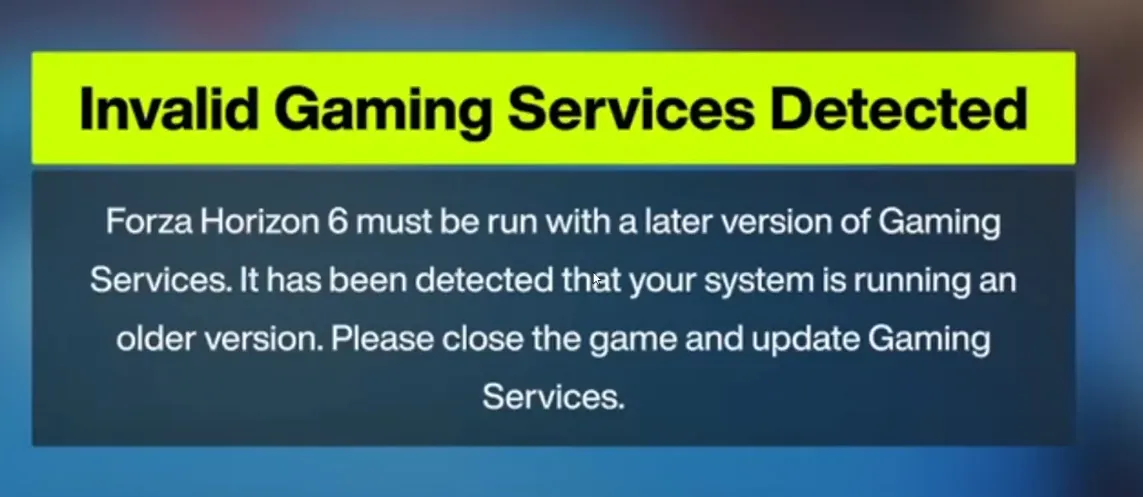
The "Invalid Gaming Services Detected" error in Forza Horizon 6 occurs when your Xbox app or Microsoft Store Gaming Services are outdated or corrupted. To fix it, reinstall Gaming Services, update Windows, and repair the game files.
Step-by-Step Fixes
1. Reinstall Gaming Services (Primary Fix)
Because Forza on PC relies heavily on the Xbox ecosystem, a glitched Gaming Services component triggers this specific error.
Right-click the Start button and select Terminal (Admin) or PowerShell (Admin) .
Copy and paste the following command, then hit Enter:
Get-AppxPackage *GamingServices* | Remove-AppxPackage -AllUsers -Force
Once that finishes, copy and paste this command and hit Enter to reinstall the latest version:
start ms-windows-store://pdp/?productid=9MWPM2CQNLHN
2. Update Microsoft Store & Xbox App
The game mandates the newest environment, and outdated Store apps will cause launch failures.
Open the Microsoft Store .
Click on Library on the bottom-left sidebar.
Click Get Updates to ensure Gaming Services and the Xbox App are on their latest versions.
3. Reset the Game & Store
If the files are cached incorrectly, resetting the app cache helps resolve instant crashes.
Open Windows Settings (Windows Key + I).
Go to Apps > Installed apps (or Apps & features ).
Search for Forza Horizon 6 .
Click the three dots, select Advanced options , and click Reset .
Repeat this process for the Xbox app.
4. Verify System Requirements & Drivers
Ensure your PC hardware meets the demanding baseline of current-gen Forza titles.
Ensure your CPU has at least four logical cores, which is the minimum requirement for recent Forza games.
Update your graphics drivers via NVIDIA GeForce Experience or AMD Software: Adrenalin Edition . [1, 2]
5. Clean Up Third-Party Software
Certain antivirus programs or background overlays flag Xbox services incorrectly.
Temporarily disable third-party antivirus software like Bitdefender, Avast, or Kaspersky to see if the game launches.
Close overlay applications like RivaTuner Statistics Server, MSI Afterburner, or Discord overlays during launch, as they frequently cause immediate crashes in Forza.
If you’re having persistent issues with Forza Horizon 6 launching due to “Invalid Gaming Services Detected” or other Xbox app-related errors, using a trusted platform like SHANNENG can help you not only secure reliable game access but also conveniently buy FH6 Credits to accelerate your progression and enjoy the festival without technical interruptions.
If you’re trying to start Forza Horizon 6 on your PC via Steam and see the dreaded Error E:0-e9 “Load Failed”, don’t panic. This issue usually happens when Gaming Services are missing or not properly registered on your system. Follow this step-by-step guide to get back on the road.
Step 1: Open PowerShell as Administrator
Click the Start Menu.
Search for PowerShell.
Right-click and select Run as Administrator.
Step 2: Open Gaming Services in the Microsoft Store
In PowerShell or your browser, enter the link below to open the Microsoft Store directly:
start ms-windows-store://pdp/?productid=9MWPM2CQNLHN
If Gaming Services is not installed, install it.
If it says Installed, continue to Step 3.
Step 3: Re-register Gaming Services
In the Administrator PowerShell, run:
Get-AppxPackage -allusers *gamingservices* | Foreach {Add-AppxPackage -DisableDevelopmentMode -Register "$($_.InstallLocation)AppXManifest.xml"}
This re-registers the services for all users.
Step 4: Start the Services Manually
Open a Command Prompt as Administrator and run:
sc.exe start GamingServices
sc.exe start GamingServicesNet
Note: Some services like Xbox Game Save and Xbox Live Networking Service might not show up in services.msc, but they run in the background.
Step 5: Restart Forza Horizon 6
After performing the above steps:
Make sure your Xbox app is up to date.
Ensure you are logged in.
Launch Forza Horizon 6 again.
This should resolve the E:0-e9 Load Failed error, letting you jump back into the festival without issues.
To fix Forza Horizon 6 crashing to desktop (CTD) and freezing on PC, you must disable conflicting third-party background software and ensure your system time and region settings are sync-locked.
Follow these steps to eliminate crashes during launch, cutscenes, or gameplay.
Core Crash Fixes
System and File Stability
Common Error Codes & Requirements
The game uses a specific string to signal exactly why it crashed: