购物车空
继续购物One of the small but satisfying touches in Forza Horizon 6 is the ability to switch between the game's radio stations while driving. Whether you want to blast electronic beats through Tokyo City streets or enjoy chill tunes while cruising the Alpine passes, knowing how to manage your in-game radio makes the ride much more immersive.
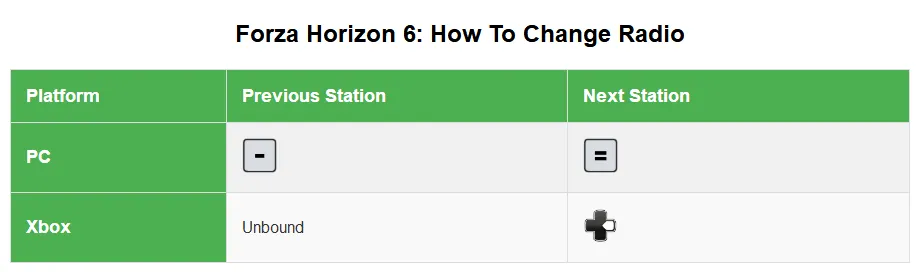
Changing radio stations in FH6 is straightforward if you know the controls:
This simple control allows you to quickly switch between stations without pulling up menus mid-drive, perfect for races or free-roam cruising.
If you prefer a custom button layout, FH6 allows full remapping:
By default, only the “Radio Next” action is mapped, so adding a “Radio Previous” shortcut makes switching stations much faster and more intuitive.
For those looking to fully unlock the game and focus on seamless exploration and racing without limits, SHANNENG offers a safe, fast, and reliable way to buy FH6 credits online, giving you instant access to cars, upgrades, and more ways to enjoy every station in the game.

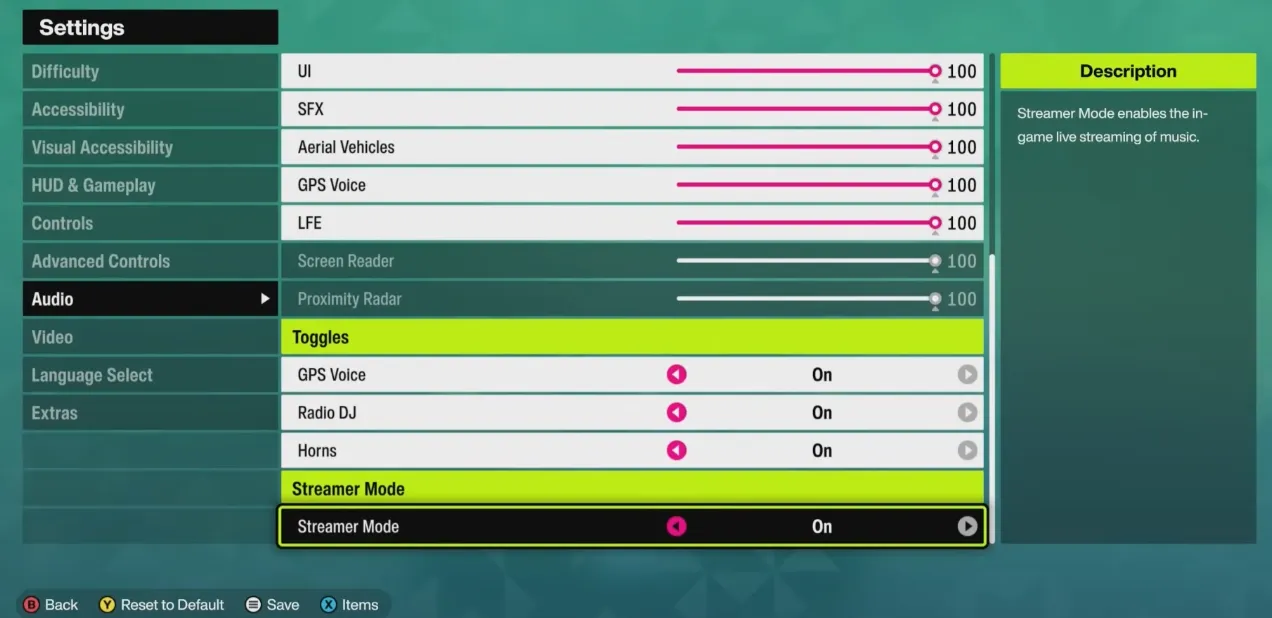
Sometimes the radio might seem unresponsive or too quiet. Here's what to check:
These tweaks ensure the music comes through clearly, whether you're tackling the Bandai‑Azuma Skyline or cruising Tokyo highways.
Changing the radio in Forza Horizon 6 is a minor detail that enhances the overall driving experience. With these controls and customizations, you can always keep the right soundtrack for your adventure, whether you're drifting through Yuki no Otani or speeding along coastal highways.