购物车空
继续购物Many ARC Raiders players prefer running solo missions to farm materials, hunt Rusties, or complete specific quests without the constant pressure of squad invites.
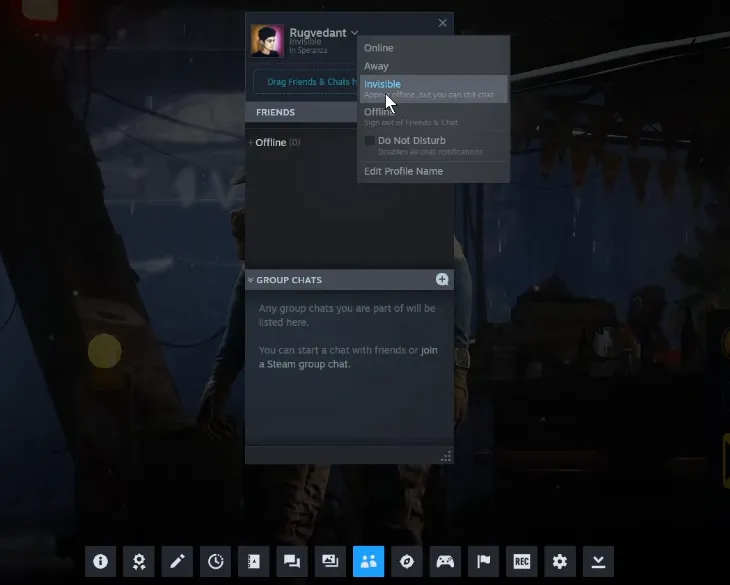
Currently, ARC Raiders does not feature a native, built-in "Appear Offline" toggle within its own social menu. To hide your online status, you must rely on the privacy settings of your specific gaming platform.
The guide below outlines how to go dark across PC and consoles, along with key platform-specific behavior you need to know.
| Platform | Setup Method | What Your Friends See | Cross-Play Limitations |
|---|---|---|---|
| PC (Steam) |
| You appear completely offline to friends browsing their Steam or in-game friend lists. You can still send invites if needed. | Fully effective for Steam-to-Steam friends. Does not reliably block visibility if friends added you via an external Embark ID. |
| Xbox Series X/S |
| Your status changes to offline on the console dashboard and the in-game ARC Raiders roster for other Xbox users. | Platform locked. Friends playing on Xbox cannot see you, but cross-play friends looking at the roster from a PS5 or PC might still see you active. |
| PlayStation 5 |
| You appear signed out to your PlayStation Network friends list and your local platform session. | Platform locked. Only hides your status from fellow PS5 players. Cross-play friends on other systems may see you online via the game's internal server list. |
If you want to skip the high-risk solo extraction runs entirely, you can easily buy Arc Raiders blueprints right here on our marketplace to unlock premium gear instantly. We offer a safe, fast, and completely hassle-free way to secure the exact weapon and item specifications you need without dealing with aggressive squads or tedious farming. Grab your blueprints today and head into your next drop fully prepared.
Setting your platform status to invisible protects you from random invites, but the game's cross-play systems can sometimes override these settings.