购物车

购物车空

继续购物
总计 ¥0.00
结算
首页 / 博客
Forza Horizon 6 Video Card Crash: Fixing FHC00 & FHC01 Errors
Zubo
May 20, 2026
9141

Many players of Forza Horizon 6 have reported sudden crashes to desktop, often accompanied by error codes FHC00 or FHC01. These issues are typically linked to GPU instability, driver conflicts, or demanding graphics settings like ray-tracing. If your game crashes when launching, loading zones, or switching between city and off-road areas, here's a practical, step-by-step guide to stabilizing your PC and keeping your racing experience smooth.
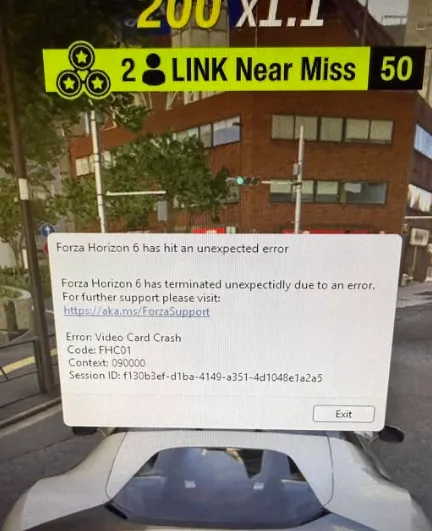
Forza Horizon 6 Video Card Crash

Critical Troubleshooting Steps

Follow these steps sequentially. Skipping steps can leave underlying problems unresolved.

1. Disable Hardware-Accelerated GPU Scheduling (HAGS)

Hardware-accelerated GPU scheduling in Windows sometimes causes instant crashes on launch or mid-game, especially with high-end ray tracing enabled.

  1. Open Windows Settings (Win + I).
  2. Go to System > Display > Graphics.
  3. Click Change default graphics settings.
  4. Toggle Hardware-accelerated GPU scheduling to Off.
  5. Restart your PC to apply changes.

Many users on Reddit report that this simple toggle resolves immediate desktop crashes.

2. Adjust In-Game Graphics Settings

If the game crashes during environment transitions or off-road sections, your GPU may be overloaded by ray-tracing calculations.

  1. Launch the game in Windowed Mode (ALT + ENTER) if it crashes before the menu.
  2. Go to Graphics Settings.
  3. Turn Environment Ray-Traced Global Illumination (GI) completely Off.
  4. Optionally, switch Ray-Traced GI to Screen-Space Reflections (SSR) for a balance between visuals and stability.

Lowering or disabling extreme settings can prevent GPU overload.

3. Close Conflicting Background Apps

Forza Horizon 6 is sensitive to overlay and driver hooks. Close or disable:

  • MSI Afterburner & RivaTuner Statistics Server (set detection level to “None” if necessary)
  • Citrix Workspace (known to trigger FHC01)
  • NVIDIA High Definition Audio devices (disable in Device Manager if using NVIDIA)

These apps can interfere with drivers and cause repeated crashes.

4. Clean GPU Driver Installation

Corrupt drivers or residual files are common culprits for FHC00 errors.

  1. Download the latest driver from NVIDIA or AMD.
  2. Boot into Windows Safe Mode.
  3. Use Display Driver Uninstaller (DDU) to remove all old driver traces.
  4. Install the new driver with Clean Install or Factory Reset option.

This ensures shaders and GPU code fragments don't conflict with the game.

5. Clear Shader Cache

Corrupted shader caches can repeatedly crash your GPU during loading.

  • NVIDIA: Delete DXCache and GLCache in %localappdata%\NVIDIA.
  • AMD: Open AMD Software > Gaming > Graphics > Reset Shader Cache.

This removes old compiled assets that may be triggering the crash.

Buy Forza Horizon 6(FH6) Credits

Understanding Forza Error Codes

Error CodeMeaningPrimary Fix
FHC00 / FHC01Video Card Crash / Driver InstabilityDisable HAGS, turn off Ray-Tracing, clean install GPU drivers
FHD01Out of Video Memory (VRAM)Lower texture quality and resolution scaling
FH205Graphics Card Not SupportedEnsure GPU supports DirectX 12 natively

Additional Tips

  • Peripherals: Wheelbases like Moza R5 or Simucube 2 Pro can cause instant crashes. Unplug them before launching the game.
  • Windowed Mode: Launching in windowed or borderless windowed mode can reduce startup crashes.
  • System Resources: Close unnecessary apps, especially browsers or monitoring tools that use GPU hooks.

Fixing video card crashes in Forza Horizon 6 mostly revolves around managing GPU load, cleaning drivers, and disabling settings that push your graphics card beyond stability. For players seeking a shortcut to avoid long grinding for wheelspins or cars while troubleshooting, marketplaces like SHANNENG provide safe, instant delivery of cheap Forza Horizon 6 credits, letting you maintain progression while optimizing your setup.

相关文章
创世灰烬
使命召唤:黑色行动6
晶陨(Crystalfall)
恐惧之谜
靈境殺戮 Black
FC 25
极限竞速:地平线5
棒球 25
NBA 2K25
宝可梦传说 ZA
午夜行者
无烬战争
森林中的99夜
剑与远征:启程
永恒之塔2
永恒之塔重制版
全明星塔防X
ARC Raiders
上古世纪编年史
缔造者:放逐之地
暗区突围:无限
明日方舟:终末地
阿斯达年代记:新世界
星空精灵2
战地风云 6
刀刃球
旋转方块(BlockSpin)
方块果实(Blox Fruits)
无主之地4
棕色尘埃2
使命召唤:现代战争4
使命召唤:黑色行动7
卡厄思梦境
College Football 27
越来越黑暗
黑魂3
DC宇宙Online
死锁
三角洲行动
暗黑破坏神2:重制版
暗黑破坏神 4
DonutSMP
七龍珠 激戰傳說
沙丘觉醒
艾尔登法环
雾锁王国
逃离塔科夫
辐射76
FC 27
最终幻想XIV
钓鱼吧
堡垒之夜
权力的游戏:国王大道
胜利女神:妮姬
灰区战争
种植花园
种植花园2
侠盗猎车手5
侠盗猎车手6
绝地潜兵2
英雄围城
Hytale
伊卡洛斯 Online
咒术回战:幻影夜行
最后纪元
天堂2
天堂2M(国际服)
天堂:經典版
天堂W - 东南亚服
失落的方舟
Madden NFL 27
冒险岛世界:阿尔泰
冒险岛怀旧服
冒險島世界
失落星船:马拉松
漫威争锋
雾影猎人
MLB The Show 26
大富翁GO
破坏者谜团 2
帝国神话:王权
NBA 2K27
新世界:永恒
奥丁神叛(国际服)
守望先锋2
幻兽帕鲁
流放之路 1(国际服)
流放之路2(国际服)
流放之路(台服)
影之刃零
植物vs脑红
宝可梦GO
宝可梦TCG口袋版
仙境传说3
仙境传说 Zero:全球版
突袭:暗影传说
渡鸦2(国际服)
竞争对手(Roblox Rivals)
ROB RUN
罗布乐思
RuneScape: Dragonwilds
沙海:索菲掠夺者
希望M2
碧海黑帆
SOL:enchant
星际公民
星际迷航OL
偷走脑红
Steam
深海迷航2
星球大战(SWTOR)
装备仔:OVERGEARED
神谕之战 怀旧服
上古卷轴Online
彩虹六号围攻
Tomaogo
火炬之光:无限
英灵神殿
无畏契约
VAMPIR:血之繼承者
战狗 WARDOGS
魔兽私服 Warmane
燕云十六声
魔兽世界:无限
鸣潮
Xbox Game Pass
游戏王:大师决斗