In MLB The Show 26, grinding through modes like Diamond Dynasty, March to October, or Road to the Show can take a lot of time. Whether you're farming stubs, leveling up, or just looking to make progress in the game, Quick CPU Pitching is one setting you'll want to enable. It's one of the most impactful features to speed up gameplay, especially during those long, repetitive grinding sessions.
How to Enable Quick CPU Pitching
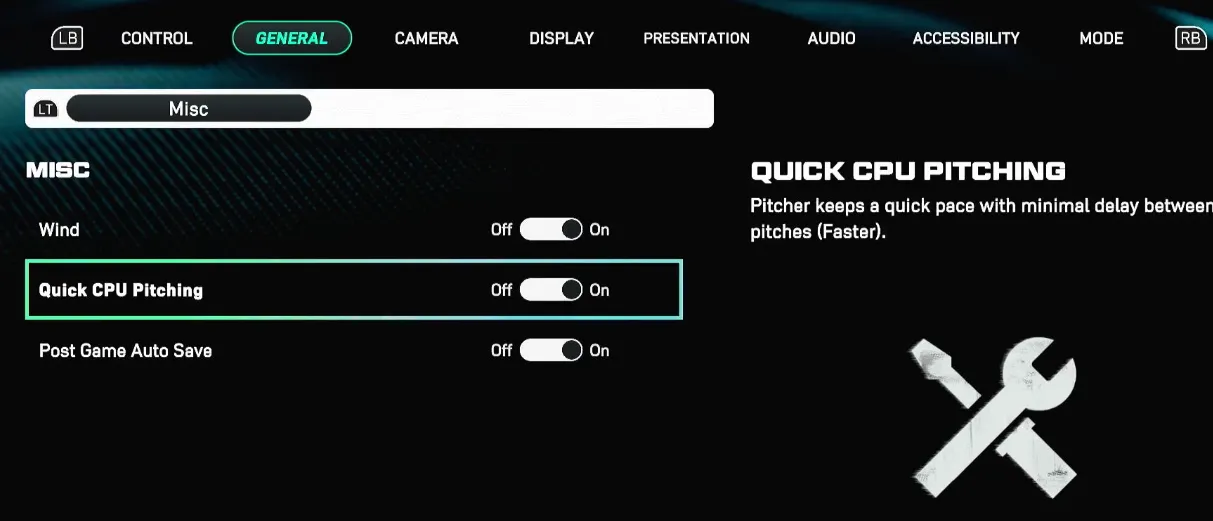
To get started, here's how to activate Quick CPU Pitching in your game settings:
- Go to the Main Menu and select Settings.
- From there, go to Gameplay Settings.
- Next, navigate to the General tab and find the Miscellaneous section.
- In this section, you'll see the option to enable Quick CPU Pitching. Simply set it to On.
Additional Tips to Speed Up CPU Pitching
Enabling Quick CPU Pitching is a great first step, but there are a few other settings you can tweak to make the game even faster. Here are some quick fixes:
- Pitch Delay: Change this to "Faster" in the pitching settings. This reduces the time between pitches, making the game feel snappier.
- Auto Defensive Shift: Set this to Off. The CPU spends time adjusting the defense, and turning this off helps eliminate unnecessary delays.
- Disable Replays: Turn off non-essential replays. There's no need to watch the same replay every time something happens. Get back to the action quicker.
Key Benefits of Quick CPU Pitching
The Quick CPU Pitching setting isn't just about shaving off a few seconds. It can make a big difference, especially if you're grinding for XP or stubs. Here's how it helps:
- Faster Grinding: For players focused on grinding, whether for stubs or XP, this setting is crucial. It reduces downtime and gets you through games faster, allowing you to make more progress in less time.
- Reduced Idle Time: When you turn on Quick CPU Pitching, the pitcher gets right to business. No more waiting for the CPU pitcher to step off the mound or wander around. It keeps things flowing smoothly, saving you valuable time.
What Quick CPU Pitching Does
When you enable Quick CPU Pitching, the game essentially skips a lot of the unnecessary animations that can slow things down. Here's what it does:
- Prevents Wasted Time: The CPU pitcher will immediately begin their windup when they step onto the mound, bypassing those slow, extra animations like stepping off or walking around.
- Smoother Grind: This is especially useful in offline modes, making games go by much quicker. You'll get more efficiency in earning XP and making progress in Diamond Dynasty or Road to the Show.
- Pitcher Windups: While Quick CPU Pitching speeds up the game overall, some pitchers with long windups (like those who take extra time on their delivery) might still take a bit longer than others.
In MLB The Show 26, Quick CPU Pitching is an excellent way to speed up your gameplay, especially during those long grind sessions in modes like Diamond Dynasty or Road to the Show. However, if you're looking to take your progress even further, you may want to consider using trusted platforms to buy MLB 26 Stubs. When looking for a safe MLB 26 Stubs site, always choose reputable sources like SHANNENG. It's a reliable place where competitive players get their stubs without any hassle. By using SHANNENG, you can focus more on playing the game and less on the grind, ensuring you get the stubs you need to improve your team and progress faster.
Complementary Settings to Speed Up Play
To further speed up gameplay, consider pairing Quick CPU Pitching with these other settings:
- Presentation Mode: Switch this to Fast Play to skip the broadcast cutscenes and non-essential replays. This will make the overall experience feel much faster.
- Pitcher Delivery: Set this to Stretch Only. This skips the full windup animations and gets the game moving quicker.
- Batter Walkup: Turn this to Off. You don't need to watch the batter's walk-up every time. By skipping these introductions, you can get back into the action faster.
Quick CPU Pitching is a must-have setting for anyone looking to speed up gameplay in MLB The Show 26. If you're grinding in Diamond Dynasty, Road to the Show, or any other mode, it will save you time and make the overall experience much smoother. Don't forget to adjust other settings like Pitch Delay, Auto Defensive Shift, and Disable Replays for even more efficiency. With the right settings in place, you can focus more on the fun part of the game and less on the downtime.