MLB The Show 26 Best Settings: Camera, Core Hitting, General Gameplay
施年正
Mar 17, 2026
5212
Recommended Camera Settings
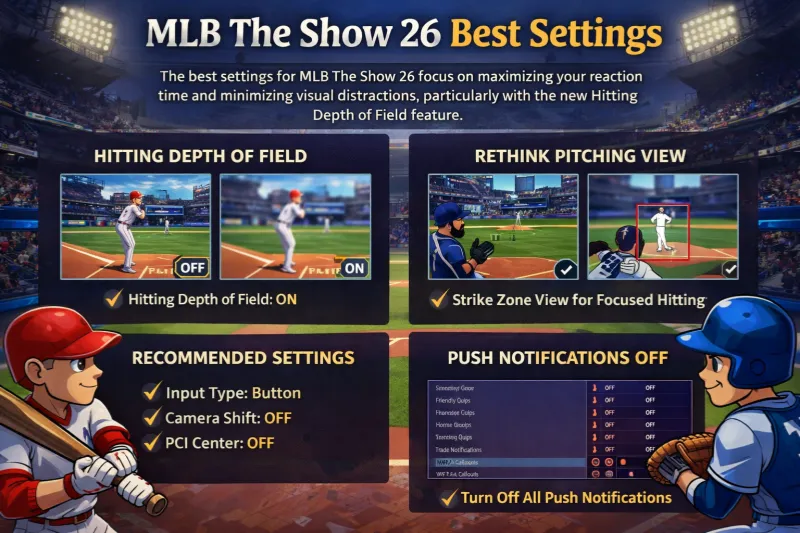
The most effective camera settings in MLB The Show 26 prioritize a clear view of the pitch path and minimize environmental distractions. A major addition this year is the Hitting Depth of Field toggle, which blurs the background to help you focus exclusively on the ball.
Camera Category
Recommended Setting
Why It Works
Hitting View
Strike Zone
Provides the closest, most consistent look at pitch movement and path.
Alt. Hitting View
Strike Zone High
Excellent for facing pitchers with high velocity or high release points.
Hitting Depth of Field
On
New Feature: Blurs the crowd and background to reduce visual noise and "batter's eye" glares.
Pitching View
Outfield or Strike Zone
Using Strike Zone for both hitting and pitching helps you see twice as many pitches from the same angle.
Fielding Camera
High
Offers a wider overhead perspective, making it easier to track fly balls and line drives.
In-Play View
Dynamic
Automatically adjusts the camera based on where the ball is hit for the best situational view.
Key Performance Tips
Hitting Depth of Field: This setting is highly recommended for stadiums with distracting elements, such as fans in white t-shirts or sun glares coming off the batter's eye.
Unified Perspective: Many competitive players prefer pitching from their hitting view (e.g., Strike Zone) to improve their overall pitch recognition.
Alternate Toggle: You can use the Alternate Hitting Camera to quickly swap to Strike Zone High mid-at-bat if you are struggling against 97+ mph fastballs.
Core Hitting Settings
In MLB The Show 26, the best hitting and PCI (Plate Coverage Indicator) settings emphasize manual control and minimal visual distractions to help you react faster to high-velocity pitches. The standout addition this year is the PCI Sensitivity slider, which allows you to customize how quickly your cursor moves across the strike zone.
For competitive play, Zone Hitting remains the gold standard, providing the highest ceiling for performance once mastered.
Setting
Recommended Value
Why It Works
Hitting Interface
Zone
Offers full control over PCI placement to match the ball's location.
PCI Sensitivity
75% to Max
New Feature: Higher sensitivity allows for instant reactions to inside fastballs.
Swing Input
Buttons
Most consistent for timing; using the right stick (Analog) can lead to unintentional "flicking".
Guess Pitch
Off
Prevents the game from punishing your PCI size if you guess the wrong location.
PCI Anchor
Off
Keeps the PCI fluid; turning it on can sometimes make the cursor feel "stuck".
Plate Coverage Indicator (PCI) Visuals
The goal for PCI visuals is to have a precise target without cluttering your view of the ball.
PCI Center: Bat or Diamonds. The "Bat" style is favored for consistency across difficulties, while "Diamonds" provides three distinct points for grounders, liners, and fly balls.
PCI Inner & Outer: None. Most advanced players disable these to reduce visual noise and focus entirely on the center point.
PCI Color: Yellow or Cyan. These colors tend to stand out best against most stadium "batter's eyes".
PCI Opacity: 40% – 60%. You want the PCI to be visible but transparent enough so it doesn't completely obscure the ball as it enters the zone.
Using the New PCI Sensitivity Slider
The PCI Sensitivity slider is a major gameplay shift in MLB The Show 26.
For Precision Ring Users: Set this to Max (100%). The physical resistance of the rings balances the high in-game sensitivity, allowing for extremely precise micro-adjustments.
For Standard Controller Users: A range of 60% – 75% is the "sweet spot" for most players to avoid overshooting the ball while still maintaining enough speed to catch up to heaters.
Reaction Training: If you find your PCI is constantly "sweeping" past the ball, dial the sensitivity down by 5% increments until it feels steady.
Core Pitching Settings
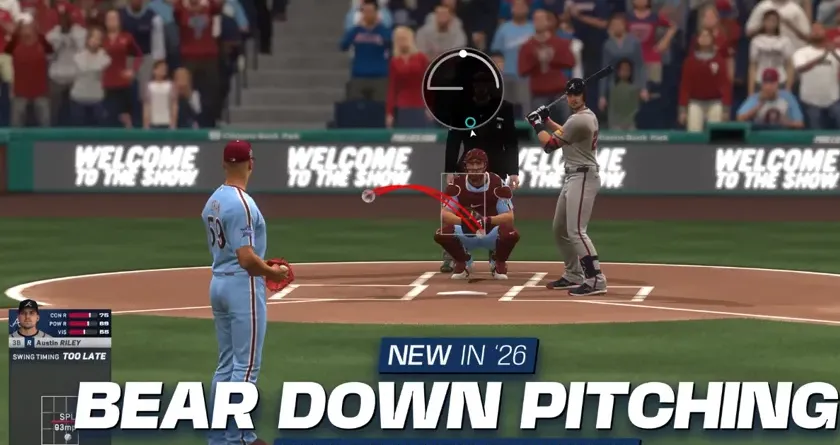
In MLB The Show 26, the best pitching settings focus on maximizing accuracy through the Pinpoint Interface and utilizing the new Bear Down Pitching mechanic for high-leverage situations. For a faster experience, the new Pitcher Delivery setting allows you to pitch exclusively from the stretch.
These settings provide the highest level of manual control for competitive play.
Setting
Recommended Value
Why It Works
Pitching Interface
Pinpoint
Offers the most precise control over pitch accuracy and the smallest PAR (Perfect Accuracy Region).
Pitching View
Outfield or Strike Zone
Outfield provides a broadcast-style view, while Strike Zone mirrors your hitting view to improve overall pitch recognition.
Pitcher Delivery
Stretch Only
New Feature: Forces all pitchers to use their faster "stretch" animation, speeding up games significantly in offline modes like Conquest or Mini Seasons.
Pitch Marker
Pitch Trail
Shows the exact path and break of the ball as it travels toward the plate.
API (Catcher)
Off
Disables suggested locations to reduce visual clutter, though beginners may prefer it On for guidance.
New Mechanics & Strategy
Bear Down Pitching: This is a new resource earned by throwing strikes and getting outs. Use it in critical moments to gain a temporary boost to velocity and control.
ABS (Automated Ball-Strike) System: In the 2026 season, you can challenge umpire calls. Keep Challenges available for late-game situations where a single ball or strike call could change the outcome.
PitchCom Audio: You can now toggle the actual audio of the catcher's pitch calls to play through your controller or TV for added realism.
Vibration: Most top players turn this Off to prevent the controller's rumble from affecting their stick precision during the Pinpoint motion.
Defense & Bullpen Management
Throwing Interface: Button Accuracy is essential. It uses a meter that guarantees a perfect throw if you time it in the blue zone.
Auto Bullpen Warm-up: Set to On for offline play so your relievers are always ready when you need to make a move.
Auto Defensive Shift: Set to Off. This prevents the CPU from shifting your fielders into positions that can be easily exploited by savvy hitters.
Mastering these manual settings is the best way to stay competitive, but building a top-tier Diamond Dynasty squad to back up your skills can take a lot of time. If you’re looking to skip the grind and pick up your favorite players sooner, you can buy MLB 26 stubs cheap at SHANNENG. It’s a reliable way to round out your rotation without spending all your free time on the market.
Core Fielding & Throwing Settings
The best defense settings in MLB The Show 26 emphasize manual control over throws and a wide-angle perspective for better tracking of batted balls. A critical recommendation for competitive play is disabling automatic shifts to prevent the CPU from creating easily exploitable gaps in your defense.
These settings provide the highest level of reliability, specifically the Button Accuracy interface, which removes "random" throwing errors if you time the meter correctly.
Setting
Recommended Value
Why It Works
Throwing Interface
Button Accuracy
Replaces RNG with a skill-based meter for perfect throws.
Throw Canceling
On
Allows you to stop a throw mid-animation if a runner stops or changes direction.
Auto Defensive Shift
Off
Prevents the CPU from shifting players into positions where "bloop" hits can easily land.
Fielding Camera
High
Provides a wider overhead view, making it much easier to track fly balls and line drives.
In-Play View
Dynamic
Automatically adjusts the camera angle based on where the ball is hit.
New Defense & Rule Mechanics
Pop Time Attribute: This is now a scalable 0–99 attribute rather than a quirk. It directly scales the speed of catcher animations for transfers and throws to second base, making catchers with high pop-time ratings significantly more effective against steals.
ABS (Automated Ball-Strike) System: In offline modes, you can use the new challenge system to contest home plate umpire calls. If you prefer a faster game without the strategic layer of challenges, set Umpire Accuracy to Perfect.
Reaction Attribute Split: The Reaction rating is now split into four directional attributes, meaning some fielders may be faster at reacting to balls hit to their left than to their right.
Auto Fielding/Throwing: While these can be turned On for a more relaxed "manager" experience, it is highly recommended to keep them Off for Diamond Dynasty or competitive play to maintain full agency over your players.
Visual & Performance Tips
In-Play View (Defense): While Dynamic is standard, some veteran players prefer Medium for its consistency and fixed zoom level.
Vibration: Turning vibration Off can help with focus during high-pressure fielding moments, preventing the haptic feedback from causing accidental stick slips during a dive or catch.
General Gameplay & Rules
The best gameplay settings for MLB The Show 26 emphasize manual control and minimal visual clutter to maximize competitive performance. For the most consistent results, the community standard remains Zone Hitting and Pinpoint Pitching, coupled with the newly added PCI Sensitivity slider to match your reaction speed.
These settings are designed to speed up the game and ensure that critical moments are decided by skill rather than random animations.
Quick CPU Pitching: On — Significantly speeds up offline games by removing the CPU's pre-pitch delays.
Auto Defensive Shift: Off — Prevents the CPU from creating gaps in your defense that opponents can exploit.
Auto Bullpen Warm-up: On — Automatically readies your relievers, ensuring they are always game-ready.
Presentation Mode: Fast Play — Skips all broadcast cutscenes and fluff for the fastest possible gameplay loop.
Perfect Close Play Calls: On — Ensures umpires don't make mistakes in critical offline situations.
Vibration: Off — Disabling haptic feedback is often preferred to prevent distractions during precise hitting or pitching motions.
Hitting & PCI Settings
Customizing your PCI (Plate Coverage Indicator) is essential for high-level play.
Hitting Interface: Zone — Essential for full manual control.
PCI Sensitivity: 75% – Max — Adjust this based on your stick control; higher values allow for faster reactions to inside fastballs.
PCI Center: Diamonds or Bat — Provides the cleanest target for the "sweet spot" of the bat.
PCI Inner/Outer: None — Removing these helps clear your vision so you can focus entirely on the ball.
PCI Opacity: 40% – 60% — Makes the target visible without completely obscuring the incoming pitch.
Pitching & Defense
Pitching Interface: Pinpoint — Offers the highest degree of accuracy once you master the gesture motions.
Pitcher Delivery: Stretch Only — Use this in offline modes to skip the longer "windup" animations and speed up the game.
Throwing Interface: Button Accuracy — Uses a timing-based meter to guarantee perfect throws and eliminate random errors.
Throw Canceling: On — Critical for stopping a throw if a baserunner baits you into a mistake.
Audio & Visual Tweaks
Hitting Depth of Field: On — Blurs the crowd and stadium background while you're batting to help you track the ball better.
Sound Effects Volume: Max — Keeping bat cracks and pitch impacts loud provides valuable audio feedback on your timing.
Commentary: Off — Most veterans turn this off to stay focused and avoid repetitive lines during long sessions.