购物车

购物车空

继续购物
总计 ¥0.00
结算
首页 / 博客
How to Fix Forza Horizon 6 Error Code E:0-19 (Load Failed)
施年正
May 27, 2026
3291

Few things are more frustrating than settling in for a session of Forza Horizon 6 only to be greeted by a "Load Failed" message. Error code E:0-19 indicates a profile loading or synchronization failure. It happens when your local game launcher loses sync with the Xbox Cloud Save servers, an issue that frequently plagues players across Windows PC, the Xbox App, and Steam Deck.
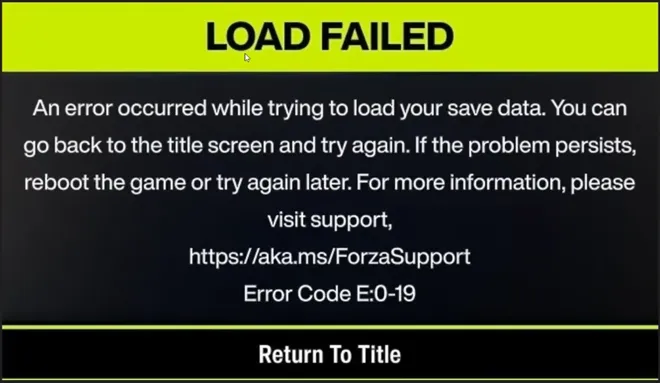
Forza Horizon 6 Error Code E:0-19 (Load Failed)

If you are stuck at the title screen with a broken save, do not panic. Follow these verified troubleshooting steps sequentially to clear the corruption and restore access to your profile.

Method 1: Reset the Local Save Cache

If your local save data becomes corrupted or desynced, forcing the Xbox network to pull a fresh copy from the cloud usually resolves the issue.

  1. Close Forza Horizon 6 completely.
  2. Open your File Explorer and navigate to your main drive (usually the C: Drive).
  3. Go to the following directory: C:XboxGamesGameSavePGS
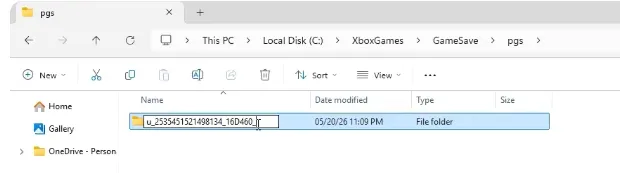
    Reset the Local Save Cache
  4. Inside the PGS folder, you will see a folder containing your save data (usually a long string of numbers and letters).
  5. Right-click this folder and select Rename. Add .old to the end of the folder name (e.g., FolderName.old). This keeps your data safe as a backup while letting the system know to look for a new file.

Method 2: Use the Gaming Services Repair Tool

Outdated or corrupted background cloud sync protocols within Windows are a primary trigger for this error. The Xbox App has a built-in tool specifically designed to fix this.

  1. Open the Xbox App on your PC.
  2. Click on your Profile Icon in the top-left corner of the window.
  3. Select Support from the dropdown menu.
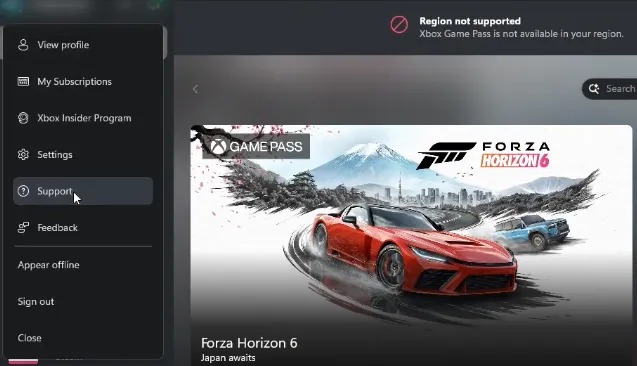
    Select Support from the dropdown menu
  4. Click on the Gaming Services Repair Tool.
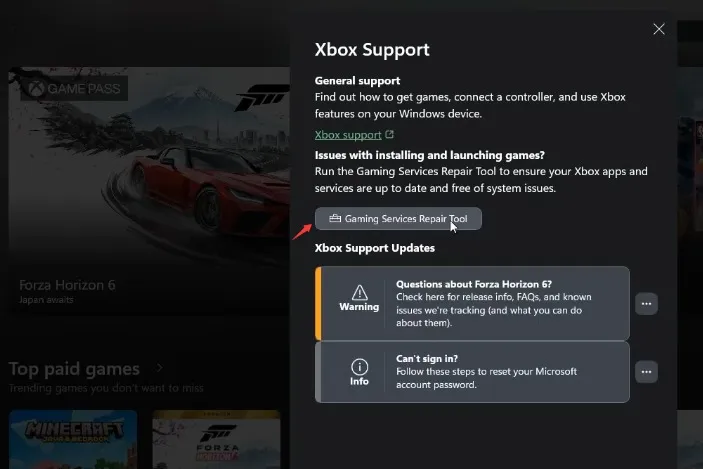
    Click on the Gaming Services Repair Tool
  5. Click Start Repairing and allow the process to finish.
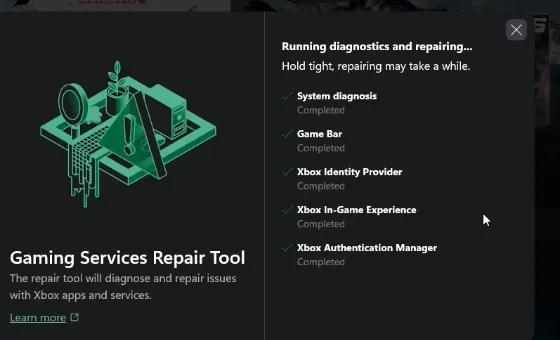
    Click Start Repairing and allow the process to finish
  6. Once completed, close the tool and restart your PC.
Forza Horizon 6 Modded Accounts

If you ever find that a persistent sync issue or server-side error completely corrupts your save file beyond repair, you won't have to face the grueling grind of rebuilding your collection from scratch. Platforms like SHANNENG offer a reliable safety net for drivers looking to bounce back quickly, making it easy to buy rare forza horizon 6 cars and instantly restock your garage with the hard-to-find rides you lost. While technical glitches like error E:0-19 are an annoying roadblock, utilizing the right troubleshooting fixes or stepping into a trusted marketplace ensures your racing journey stays firmly on track without losing momentum.

Method 3: Verify and Repair Game Files

Whether you purchased the game through Steam or the Microsoft Store, a missing or corrupted game file can prevent your profile from loading correctly.

For Xbox App / Windows Store Users:

  1. Open the Xbox App and locate Forza Horizon 6 in your library.
  2. Click the three dots (...) next to the play button.
  3. Select Manage, go to the Files tab, and click Verify and Repair.

For Steam Users:

  1. Open Steam and go to your Library.
  2. Right-click on Forza Horizon 6 and select Properties.
  3. Navigate to the Installed Files tab.
  4. Click Verify integrity of game files... and wait for the scan to complete.

Method 4: Force an Offline Save (The Retry Loop)

If the server is experiencing high traffic or lag, your cloud data might fail to fetch, timing out into error E:0-19. You can sometimes force the game to bypass this by shifting into local offline verification.

  1. Completely close the game and power-cycle your internet router and PC/Steam Deck.
  2. Launch the game and wait for the E:0-19 error window to pop up.
  3. Instead of quitting, continuously hit the Retry option.
  4. For many players, repeatedly pushing retry forces the game to switch to an "Offline Save" state within a few minutes, granting access to the game.

Method 5: Clear Windows Store Cache (Steam & Cloud Sync Gaps)

Playing across multiple machines or switching between online and offline modes on portable devices like the Steam Deck can fragment your profile status. If your game hangs indefinitely while syncing, try clearing your Windows network cache.

  1. Press the Windows Key + R to open the Run dialog box.
  2. Type WSReset.exe and hit Enter.
  3. A blank Command Prompt window will appear. Do not close it; wait about 30 seconds for it to automatically clear the cache and open the Microsoft Store.
  4. If you are prompted with a save conflict dialog when launching the game afterward, look at the timestamps. Note that the display often shows the date the file was originally created, not when it was last saved. Choose the file that safely mirrors your primary platform profile history.

Still Stuck? Contact Support for a Rollback

If none of these steps get you past the title screen, your cloud profile container might be severely corrupted on the server side.

If this happens, log a ticket on the official Forza Motorsport Support Portal. While the support team usually cannot recover the specific broken file, they can manually wipe the corrupted cloud container, prompt a fresh initialization of your account, and gift back your earned cars, garage history, and credits to your new save instance.

相关文章
创世灰烬
使命召唤:黑色行动6
晶陨(Crystalfall)
恐惧之谜
靈境殺戮 Black
FC 25
极限竞速:地平线5
棒球 25
NBA 2K25
宝可梦传说 ZA
午夜行者
无烬战争
森林中的99夜
剑与远征:启程
永恒之塔2
永恒之塔重制版
全明星塔防X
ARC Raiders
上古世纪编年史
缔造者:放逐之地
暗区突围:无限
明日方舟:终末地
阿斯达年代记:新世界
星空精灵2
战地风云 6
刀刃球
旋转方块(BlockSpin)
方块果实(Blox Fruits)
无主之地4
棕色尘埃2
使命召唤:现代战争4
使命召唤:黑色行动7
卡厄思梦境
College Football 27
越来越黑暗
黑魂3
DC宇宙Online
死锁
三角洲行动
暗黑破坏神2:重制版
暗黑破坏神 4
DonutSMP
七龍珠 激戰傳說
沙丘觉醒
艾尔登法环
雾锁王国
逃离塔科夫
辐射76
FC 27
最终幻想XIV
钓鱼吧
堡垒之夜
权力的游戏:国王大道
胜利女神:妮姬
灰区战争
种植花园
种植花园2
侠盗猎车手5
侠盗猎车手6
绝地潜兵2
英雄围城
Hytale
伊卡洛斯 Online
咒术回战:幻影夜行
最后纪元
天堂2
天堂2M(国际服)
天堂:經典版
天堂W - 东南亚服
失落的方舟
Madden NFL 27
冒险岛世界:阿尔泰
冒险岛怀旧服
冒險島世界
失落星船:马拉松
漫威争锋
雾影猎人
MLB The Show 26
大富翁GO
破坏者谜团 2
帝国神话:王权
NBA 2K27
新世界:永恒
奥丁神叛(国际服)
守望先锋2
幻兽帕鲁
流放之路 1(国际服)
流放之路2(国际服)
流放之路(台服)
影之刃零
植物vs脑红
宝可梦GO
宝可梦TCG口袋版
仙境传说3
仙境传说 Zero:全球版
突袭:暗影传说
渡鸦2(国际服)
竞争对手(Roblox Rivals)
ROB RUN
罗布乐思
RuneScape: Dragonwilds
沙海:索菲掠夺者
希望M2
碧海黑帆
SOL:enchant
星际公民
星际迷航OL
偷走脑红
Steam
深海迷航2
星球大战(SWTOR)
装备仔:OVERGEARED
神谕之战 怀旧服
上古卷轴Online
彩虹六号围攻
Tomaogo
火炬之光:无限
英灵神殿
无畏契约
VAMPIR:血之繼承者
战狗 WARDOGS
魔兽私服 Warmane
燕云十六声
魔兽世界:无限
鸣潮
Xbox Game Pass
游戏王:大师决斗