购物车

购物车空

继续购物
总计 ¥0.00
结算
首页 / 博客
How to Fix Forza Horizon 6 Error Code E:0-17
施年正
May 27, 2026
2010

Hitting a roadblock before you even reach the starting line is incredibly frustrating. If you are trying to launch Forza Horizon 6 and getting hit with a "Load Failed" screen alongside Error Code E:0-17, you aren't alone.
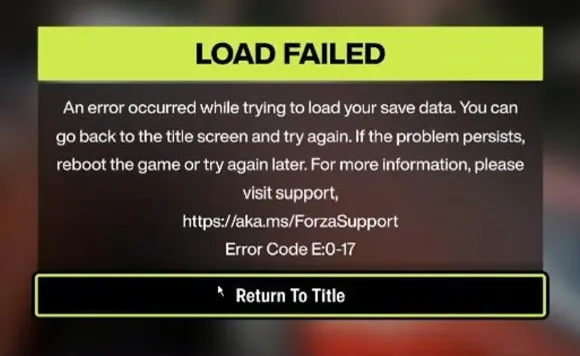
Forza Horizon 6 Error Code E:0-17

This specific error points to a save file loading failure. It usually happens when the game cannot properly authenticate or sync your profile data with the cloud servers. Most of the time, the culprit isn't a permanently corrupted save file, but rather network restrictions or aggressive Windows privacy settings blocking communication with Microsoft's servers.

Here are the most effective ways to clear the error and get back on the road.

1. Reset the Windows Hosts File

If you have ever used Windows "debloating" tools, privacy scripts, or manually modified your system settings to block telemetry, your computer might be intentionally blocking the exact servers Forza needs to load your profile.

You can fix this by resetting your Windows hosts file to default:

  1. Open your File Explorer.
  2. Navigate to the following path:

    C:WindowsSystem32driversetc

  3. Look for the file named hosts.
  4. Right-click the file and select Rename. Change it to hostsBACKUP. (Alternatively, if you don't care about previous tweaks, you can simply delete it).
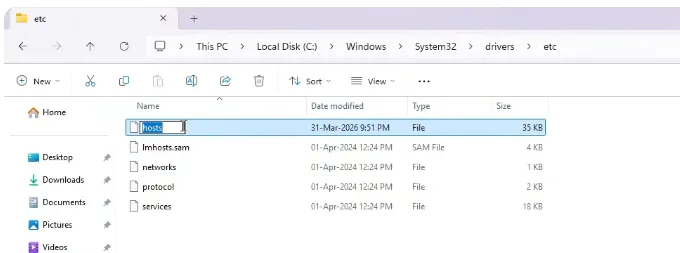
    Reset the Windows Hosts File
  5. Restart your computer and try launching the game again.

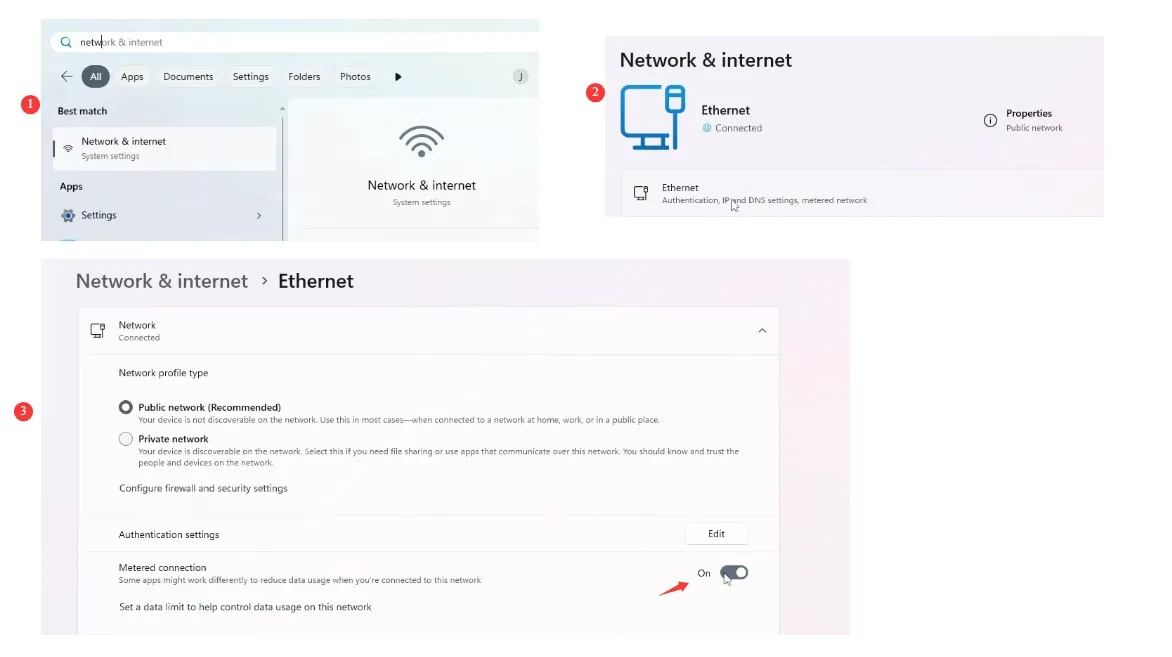
2. Turn Off Metered Connection

Turn Off Metered Connection

Windows has a feature called "Metered Connection" designed to save data on limited internet plans. However, this feature frequently restricts background data syncing, which prevents the Xbox network from pulling your latest cloud save.

To turn it off:

  1. Open the Windows Start Menu and click on Settings (the gear icon).
  2. Go to Network & Internet.
  3. Select your current connection type: Wi-Fi or Ethernet.
  4. Find the Metered connection toggle and switch it to Off.
Forza Horizon 6 Modded Accounts

If troubleshooting those system settings feels like too much of a headache and you just want to get straight to the fun part of racing, there are ways to fast-track your progress once your game is running smoothly again. Instead of spending hours grinding through repetitive races to rebuild your garage after a save error, you can visit SHANNENG to buy fast forza horizon 6 cars directly. It is a quick and reliable shortcut to lock down the highest-performance vehicles in the game, letting you bypass the technical frustrations and jump right back onto the asphalt with the best rides available.

3. Revert Windows Debloat and Privacy Tweaks

If you used third-party optimization programs like O&O ShutUp10 or the Chris Titus Tech Windows Utility, these tools often disable core Windows telemetry and error reporting systems. Forza Horizon 6 requires these services active to validate your profile.

  1. Re-open the privacy or debloat tool you previously used.
  2. Look for options to Restore Default Settings or undo the tweaks.
  3. Ensure that Windows Error Reporting and standard Microsoft telemetry are allowed.
  4. Reboot your system for the changes to take effect.

4. Disable VPNs and Network-Wide Ad Blockers

Because Error E:0-17 is heavily tied to server communication, your security software might be getting in the way.

  • VPNs: Temporarily disable any third-party VPNs or proxy servers before launching the game.
  • Ad Blockers: If you use network-level ad blocking like Pi-hole or AdGuard Home on your router, check your live query logs while launching the game. You will likely need to whitelist blocked Xbox Live, Microsoft telemetry, or cloud-saving domains.

5. Keep the Xbox App Open (For Steam Players)

If you purchased Forza Horizon 6 on Steam, the game still relies on an underlying handshake with the Xbox network. Sometimes this handshake fails if the background environment is idle.

  1. Completely close Forza Horizon 6.
  2. Open the Xbox App on your PC manually and sign in.
  3. Leave the Xbox App running on your desktop, switch back to Steam, and launch the game.

6. Update Gaming Services and Verify Files

Corrupted background modules can cause sudden authentication drops. Ensuring everything is updated can solve the issue.

  • Update Microsoft Dependencies: Open the Microsoft Store, click on Library in the bottom left, and check for updates. Ensure Gaming Services and the Xbox App are completely up to date.
  • Verify Game Files (Steam): Right-click Forza Horizon 6 in your Steam Library > Properties > Installed Files > Verify integrity of game files. This ensures no local launch configuration files are damaged.
相关文章
创世灰烬
使命召唤:黑色行动6
晶陨(Crystalfall)
恐惧之谜
靈境殺戮 Black
FC 25
极限竞速:地平线5
棒球 25
NBA 2K25
宝可梦传说 ZA
午夜行者
无烬战争
森林中的99夜
剑与远征:启程
永恒之塔2
永恒之塔重制版
全明星塔防X
ARC Raiders
上古世纪编年史
缔造者:放逐之地
暗区突围:无限
明日方舟:终末地
阿斯达年代记:新世界
星空精灵2
战地风云 6
刀刃球
旋转方块(BlockSpin)
方块果实(Blox Fruits)
无主之地4
棕色尘埃2
使命召唤:现代战争4
使命召唤:黑色行动7
卡厄思梦境
College Football 27
越来越黑暗
黑魂3
DC宇宙Online
死锁
三角洲行动
暗黑破坏神2:重制版
暗黑破坏神 4
DonutSMP
七龍珠 激戰傳說
沙丘觉醒
艾尔登法环
雾锁王国
逃离塔科夫
辐射76
FC 27
最终幻想XIV
钓鱼吧
堡垒之夜
权力的游戏:国王大道
胜利女神:妮姬
灰区战争
种植花园
种植花园2
侠盗猎车手5
侠盗猎车手6
绝地潜兵2
英雄围城
Hytale
伊卡洛斯 Online
咒术回战:幻影夜行
最后纪元
天堂2
天堂2M(国际服)
天堂:經典版
天堂W - 东南亚服
失落的方舟
Madden NFL 27
冒险岛世界:阿尔泰
冒险岛怀旧服
冒險島世界
失落星船:马拉松
漫威争锋
雾影猎人
MLB The Show 26
大富翁GO
破坏者谜团 2
帝国神话:王权
NBA 2K27
新世界:永恒
奥丁神叛(国际服)
守望先锋2
幻兽帕鲁
流放之路 1(国际服)
流放之路2(国际服)
流放之路(台服)
影之刃零
植物vs脑红
宝可梦GO
宝可梦TCG口袋版
仙境传说3
仙境传说 Zero:全球版
突袭:暗影传说
渡鸦2(国际服)
竞争对手(Roblox Rivals)
ROB RUN
罗布乐思
RuneScape: Dragonwilds
沙海:索菲掠夺者
希望M2
碧海黑帆
SOL:enchant
星际公民
星际迷航OL
偷走脑红
Steam
深海迷航2
星球大战(SWTOR)
装备仔:OVERGEARED
神谕之战 怀旧服
上古卷轴Online
彩虹六号围攻
Tomaogo
火炬之光:无限
英灵神殿
无畏契约
VAMPIR:血之繼承者
战狗 WARDOGS
魔兽私服 Warmane
燕云十六声
魔兽世界:无限
鸣潮
Xbox Game Pass
游戏王:大师决斗