购物车

购物车空

继续购物
总计 ¥0.00
结算
首页 / 博客
Forza Horizon 6 Best Wheel Settings
Zubo
May 21, 2026
787

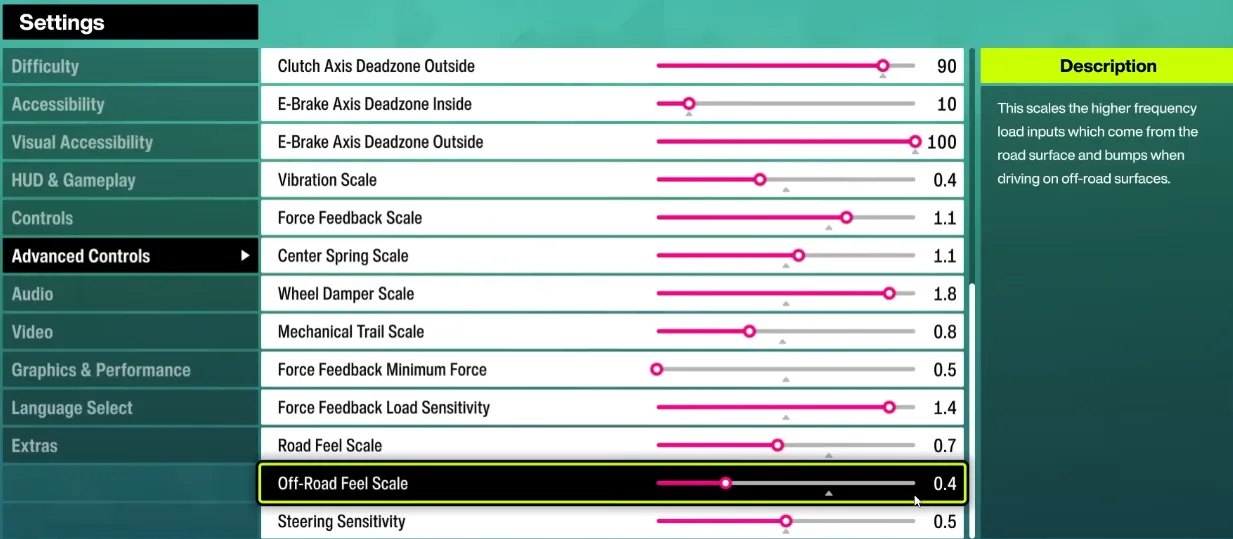
If you want to get the most out of your wheel in Forza Horizon 6 (FH6), proper setup is essential. Players have reported that default wheel settings often lead to oversteer, spinning out, and poor alignment between wheel input and on-screen car behavior. Below is a practical guide to optimize your setup for both direct drive and belt-driven wheels like the Logitech RS50, G920/923, and Thrustmaster series.
Forza Horizon 6 Best Wheel Settings

1. Core Wheel Settings

SettingRecommended RangeNotes
Steering Sensitivity40–50Lower values give smoother control; higher values make the wheel twitchier.
Operating Range (Angle)540–720°540° is favored for tighter control and avoiding spinouts; 720° for more natural cockpit feel. Avoid 900°–1080° for FH6 unless you want delayed responses.
Dampener0–35Reduces oscillations; 0 for a sharper feel, 30+ for smoother, slower steering return.
Strength / Torque5–8 NmMax strength helps sense car weight; too high can be fatiguing. Adjust to wheel type.
Force Feedback Filter1–8Low for sharper feedback; higher filters reduce small vibrations and noise.
Auto Force Feedback FilterOffManual control is recommended for fine-tuning FH6 feel.

Tip: Adjust one setting at a time and test in a safe environment to find your personal sweet spot.

2. Steering Linearity

Steering linearity controls how the wheel's rotation maps to the car's turning:

  • Recommended starting value: 25
  • Too high → wheel feels too sensitive at small angles.
  • Too low → wheel feels “floaty” and unresponsive.

Check alignment by slowly turning the wheel in first-person view. The in-game steering should match your real-world input.

Buy Forza Horizon 6(FH6) Credits

3. Drifting vs Normal Driving

  • Normal driving: Focus on lower wheel rotation (540°–720°) and moderate strength for precise control.
  • Drifting: Some players increase dampener and slightly reduce FFB filter to allow smoother counter-steering. For example: dampener 35, FFB filter 5, strength ~5.4 Nm.

4. Pedal Calibration

  • Ensure pedals are correctly rebinding in-game.
  • Brake force can be adjusted to taste; too soft → late braking, too hard → jerky stops.
  • Some users prefer maximum pedal linearity for consistent throttle feel.

5. Common Community Observations

  • Spinouts: Many users find FH6 more sensitive than FH5; turning down operating range helps.
  • Cockpit mismatch: Using 540° rotation often keeps steering aligned with cockpit visuals.
  • Compatibility mode: RS50 vs Pro mode affects pedal mapping and wheel feel; restart the game after changing modes.
  • G923/G920 users: Try steering linearity first; adjust FFB strength in the Logitech software and disable Auto Filter for better results.
  • Direct drive wheels: Max strength gives better weight and resistance; filter and dampener reduce jitter.

6. Testing & Adjustment Strategy

  1. Start with 540° rotation, sensitivity 50, linearity 25, dampener 0.
  2. Test in a mountain pass or festival circuit.
  3. Adjust strength or FFB filter if the car feels too light or harsh.
  4. For drifting, increase dampener and slightly reduce FFB filter.
  5. Only change one setting per test to isolate effects.

By carefully adjusting these parameters, FH6 wheel users can enjoy a smoother, more controllable experience. The goal is control over raw force, letting you confidently take sharp turns without spinning out.

If you want to skip trial and error and get fully optimized credits and items in FH6, you can visit SHANNENG, a trusted platform to quickly buy safe Forza Horizon 6 credits, letting you upgrade cars and experiment with setups without worrying about grind time.


相关文章
流亡黯道2(國際版)
侠盗猎车手5
暗黑破壞神 4
流亡黯道(國際版)
地產大亨 GO!
火炬之光:無限
辐射76
沙丘觉醒
棒球 25
College Football 27
使命召唤:黑色行动7
侠盗猎车手6
罗布乐思
Madden NFL 27
种植花园
FC 27
NBA 2K27
无烬战争
偷走脑红
森林中的99夜
绝地潜兵2
宝可梦传说 ZA
永恆之塔2
ARC Raiders
创世灰烬
美國職棒大聯盟 26
恐惧之谜
天堂:經典版
Dark and Darker
失落星船:马拉松
VAMPIR:血之繼承者
暗黑破壞神 2: 獄火重生
英雄围城(Hero Siege)
晶陨(Crystalfall)
天堂W - 东南亚服
帝国神话:王权